


Messenger Chat Home
4.3731.00 Reviews
App Specs
- Version
- 2.01.28
- Updated On
- License
- Free
- Downloads
- 1,000,000+
- Developer
- Avalon Solutions LLC
- Categories
- Personalization
- Platform
- Android
Screenshots

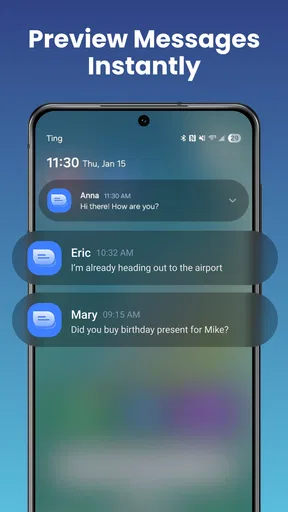
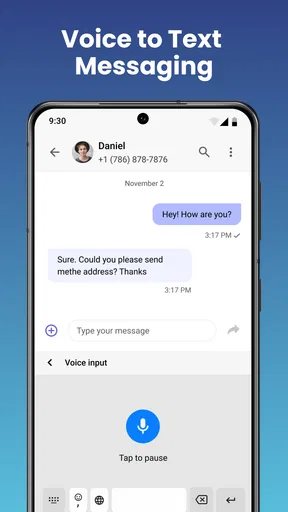
 Analysis by AppCompare
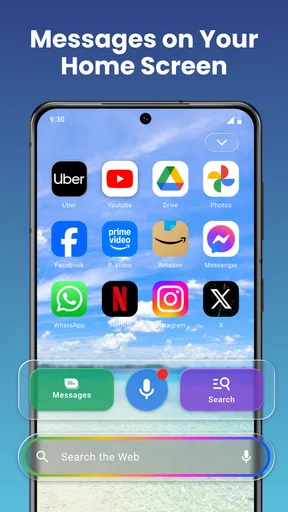
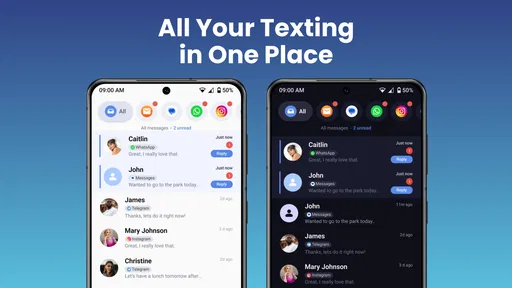
I judge a messaging app less by its first screen than by what happens when I’m trying to reply quickly, find a conversation, or get a group plan back on track. Messenger Chat Home is a free personalization app from Avalon Solutions LLC, built around making messaging feel closer to the home screen launcher experience. Its appeal is clearest if you want quick access to SMS and group chats, with GIFs and emojis close at hand, rather than another elaborate social platform.
Where setup can feel confusing
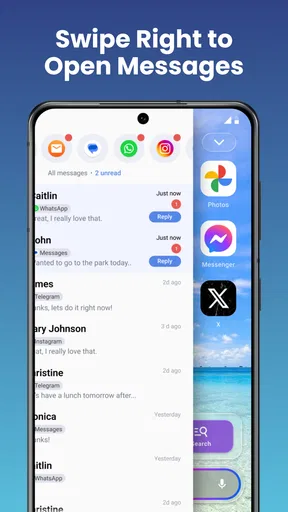
The app’s central idea is straightforward, but changing how messaging fits into your phone can bring a few small decisions. If you install it expecting every existing conversation to look and behave differently straight away, pause and check what the app is asking you to use as your messaging starting point. A launcher-style approach can feel unfamiliar if you normally open a dedicated messaging app from its icon and do everything inside one screen.
I’d also separate the app’s visual promise from the basics of sending a message. Personalization can make the experience feel more inviting, but it cannot make a delayed reply arrive faster or fix a contact detail that is wrong on the phone. When something seems off, first work out whether the issue is the way you’re opening chats, the conversation itself, or the phone’s ordinary messaging setup. That simple distinction saves time and avoids changing settings at random.
Checks worth making before relying on it
Before moving your everyday texting routine over, try a low-stakes conversation. Open an existing chat, send a short message, and check that the reply appears where you expect. Then try a group conversation and see whether the chat is comfortable to reach from the home-screen workflow. I find this more useful than judging the app from a quick tour: it tests the steps you’ll repeat most often without putting an important conversation at risk.
It is also sensible to look closely at any prompts shown during setup and make choices deliberately. I wouldn’t assume that a customization app automatically replaces every part of a phone’s messaging experience. If you’re uncertain about a prompt, read it before proceeding, and keep your usual route to messages available until you’re confident the new routine suits you.
A more personal route into everyday chats
Messenger Chat Home is a free app in the personalization category, and that framing matters: its distinctive point is how messaging connects with the home screen, not an attempt to turn texting into a full social network. The app was released on April 3, 2024, and its current version is 2.01.10, with Android 10 as the minimum operating system. It has a 4.4 average from around 8,400 ratings, and more than 500,000 installs. Those figures suggest it has found an audience, though I’d still decide based on whether its home-screen-first idea suits your habits.
What the home-screen approach is good for
The practical benefit is reducing the distance between noticing a conversation and replying. If you often send a quick SMS while doing something else, having messaging and expressive touches such as GIFs and emojis close to your launcher can make the routine feel more direct. That is a different emphasis from a conventional messaging app, where the main experience is usually opening the app first and then navigating to the conversation.
Worth Reading Before You Choose

EA SPORTS FC Mobile 26 Is a Bigger Football Game, but It Takes Time

Flipboard Shows What News Apps Must Do Beyond the Feed

Switching to Android Auto Means Rethinking Your Driving Routine

Google Calendar Makes a Crowded Week Easier to Manage

Ludo King Makes the Most of the Minutes Between Plans

Baby Panda World Brings Quick Play to Modern Phones, but Its Game Library Feels Busy
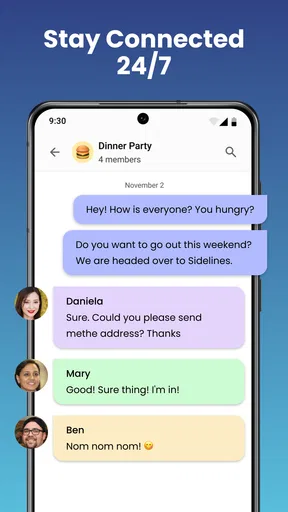
A realistic example is coordinating a casual dinner while you’re already checking your phone for something else. You can use a group chat to settle a time, add an emoji to make a short reply less abrupt, and share a GIF when the plan finally comes together. The value is not that the app changes what a group conversation can do; it is that the route into that conversation may fit more naturally into the way you use your home screen.
That convenience has a trade-off. A home-screen-led experience is helpful when you want messaging close by, but it may not feel like an improvement if you prefer a clean launcher and one dedicated app for all conversations. Before making it your default habit, think about whether quick access is genuinely useful to you or whether it would simply put more visual activity on the screen you already use for everything else.
Recovering when a conversation does not go as expected
If a message seems missing, I would avoid immediately reinstalling the app or changing several settings at once. First reopen the conversation and check whether the message is still there. Then try sending a simple test to someone you trust. If the test works but a particular group conversation does not, the problem may be limited to that chat rather than the whole messaging setup.
For a GIF or emoji that fails to appear as expected, try a plain text reply in the same conversation. That helps distinguish a problem with the expressive content from a broader sending issue. It is a small troubleshooting habit, but it prevents a common mistake: treating every hiccup as proof that the entire app is broken.
If you rely on SMS for something time-sensitive, keep the phone’s familiar messaging route in mind while you get used to the app. I would not use a new interface for the first time to send an urgent update without checking that the basic send-and-receive flow works. A short test beforehand is more reassuring than guessing during a busy moment.
When the phone or the conversation may be the real issue
Not every delayed or absent reply points to the app. The other person may not have seen the message yet, a group may be busy, or the phone may be having a temporary connectivity issue. I’d check whether other ordinary phone functions are working before changing how the app is set up. If several conversations are affected at once, that is a different clue from one chat behaving oddly.
It also helps to keep expectations realistic about what personalization can solve. Making messaging easier to reach does not settle disagreements about which service a group wants to use, nor does it guarantee that everyone will see a message immediately. If your friends or family are committed to another messaging service, that shared preference may matter more than the convenience of your own launcher.
Who is likely to enjoy it—and who may not
I can see this being a good fit for someone who uses SMS and group chats regularly, likes a more personal phone interface, and wants GIFs and emojis to be part of quick everyday replies. It may also appeal to people who feel that a standard messaging icon is too disconnected from the rest of their home-screen routine. The Everyone content rating makes it broadly suitable from an age-classification standpoint, though families should still decide what messaging habits make sense for their own needs.
I’d be less inclined to recommend it to someone who wants a minimalist launcher, dislikes changing established phone habits, or mainly communicates through a separate platform that their contacts already use. If your priority is a deep set of tools for organizing conversations, managing work groups, or keeping all communication inside one established service, a conventional messaging app or the service your contacts already share may be the more practical choice.
Compared with the usual alternatives in this space, the difference is the point of entry. A standard SMS app centers on its inbox and conversation list; this app’s pitch is that messaging can sit closer to the launcher and feel more personalized. Neither approach is automatically better. The conventional route is familiar and easy to understand, while a launcher-oriented route can shave off a step for people who like to reach chats from the home screen. I’d choose based on that daily workflow, not on the assumption that a different interface means more powerful messaging.
Useful habits for getting a fair first impression
One tip I’d use is to try the app during an ordinary, low-pressure part of the day rather than during a long group discussion. That gives you a chance to notice whether the home-screen connection feels natural without confusing the result with a flood of incoming messages. After that, test a one-to-one chat and a group chat separately: they reveal different parts of your routine, and one may suit the new layout better than the other.
Another practical trade-off is how much personalization you actually want. It is easy to spend time choosing a look and then discover that the visual change matters less than how quickly you can get to a conversation. I’d settle on a comfortable setup, use it for a while, and only then decide whether more visual adjustment is worth the effort. The point is to make messaging easier to live with, not to turn setup into a project.
Finally, keep an eye on how the app feels during your normal phone use. If having chats closer to the home screen encourages useful, quick replies, that is a real benefit. If it makes the screen feel busier or draws you into conversations when you intended to do something else, that is a good reason to return to a more conventional arrangement. Personalization is only useful when it supports the way you want to use your phone.
First impressions and everyday features
Right off the bat, Messenger Chat Home impresses with its sleek and user-friendly interface. Setting it up was a breeze, and I was quickly greeted by a customizable home screen that felt welcoming. It's like the app knew exactly what I needed to feel at ease. The vibrant colors and intuitive design make navigating through the app a pleasant experience.
Features Galore
Now, let's dive into the features because that's where the magic happens. One of the standout elements is the app's ability to personalize the chat environment. You can pick themes and colors that match your vibe. I went with a calming blue theme, and it felt like a breath of fresh air every time I opened a chat.
Another cool feature is the smart notifications. Instead of bombarding you with alerts, the app intelligently prioritizes messages. This means you only get notified about the things that truly matter, like your mom's latest cat meme or your friend's new travel plans.
Conversations Made Easy
Of course, a messaging app is only as good as its chat features, and Messenger Chat Home doesn't disappoint. The app supports a range of multimedia options, allowing you to send gifs, stickers, and voice notes with ease. I had a blast sending funny gifs back and forth with my friends.
Texting is smooth, and the keyboard is responsive, which is a big plus in my book. No more lagging or missed letters, just seamless typing. The app also supports group chats, making it easy to coordinate plans with multiple friends without any hassle.
Security and Privacy
In today's digital age, security is paramount, and this app takes it seriously. Conversations are encrypted, giving you peace of mind that your chats are private. There's also a nifty feature that allows you to lock chats with a password or fingerprint. I found this especially useful for keeping my personal chats secure.
Room for Improvement
While the app is pretty impressive, there are some areas where it could improve. For instance, the customization options, while extensive, could be more varied. I’d love to see more themes and backgrounds added in future updates.
Also, the app can be a bit heavy on battery usage if you’re an avid chatter. I noticed my phone's battery draining quicker than usual during extended use, which is something to keep an eye on if you’re planning a long chat session.
Final Thoughts
Overall, Messenger Chat Home delivers a delightful messaging experience packed with personalization and smart features. It’s like having a cozy little chat room right on your phone. Whether you're a casual chatter or a messaging enthusiast, this app is worth checking out.
If you're ready to make your chats feel a bit more like home, give this app a try. You might just find it becoming your new favorite messaging companion.
Pros
- Easy integration with social media accounts.
- Customizable chat themes and colors.
- Supports voice and video calls.
- User-friendly interface for all ages.
- Low data consumption during chats.
Cons
- Limited offline accessibility features.
- Occasional notification delays.
- Some features require in-app purchases.
- Privacy settings can be complex to navigate.
- No option to delete sent messages.
FAQs for Messenger Chat Home
What is Messenger Chat Home?
Messenger Chat Home is a versatile messaging app designed for both Android and iOS platforms. It offers seamless communication through text, voice, and video calls. Users can also enjoy additional features like customizable themes, sticker packs, and end-to-end encryption for enhanced privacy. It's perfect for staying connected with friends and family.
Is Messenger Chat Home free to use?
Yes, Messenger Chat Home is free to download and use. The app provides a wide range of features without any cost. However, it may offer in-app purchases for premium features such as advanced customization options or exclusive sticker packs. Users can decide whether to invest in these additional features.
How secure is Messenger Chat Home?
Messenger Chat Home prioritizes user security with end-to-end encryption, ensuring that messages are only accessible to the sender and the receiver. Additionally, the app regularly updates its security protocols to protect against potential threats. Users can also set up two-factor authentication for an extra layer of security.
Can I use Messenger Chat Home on multiple devices?
Yes, Messenger Chat Home supports multi-device usage. Users can log into their account on multiple devices and continue their conversations seamlessly. The app syncs messages across all devices, so whether you're on your phone, tablet, or computer, you'll always have access to your chat history.
What are the customization options available in Messenger Chat Home?
Messenger Chat Home offers a variety of customization options to enhance user experience. You can personalize chat themes, change the app's appearance with different color schemes, and use various sticker packs. The app also allows users to set custom notification sounds for different contacts, making it easier to identify messages.


